Fighting a two-front war: Headspace
Headspace helped make meditation mainstream — then had to defend that win against a well-funded direct rival and a free alternative at the same time. Here’s how to read a report for a mature category with both a head-to-head competitor and a price-based insurgent.

Module 01 — General Information
Headspace
Flat Black Films
Store Metrics
Platform Comparison — iOS vs Android
Exhibits — Screenshots



Module 02 — App Description Analysis
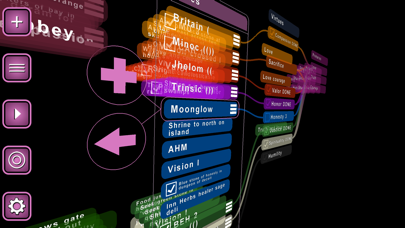
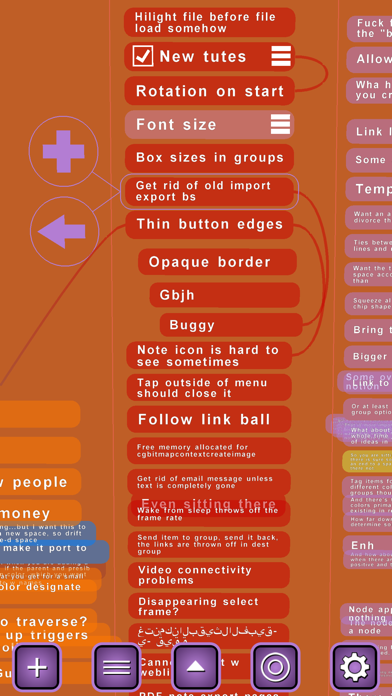
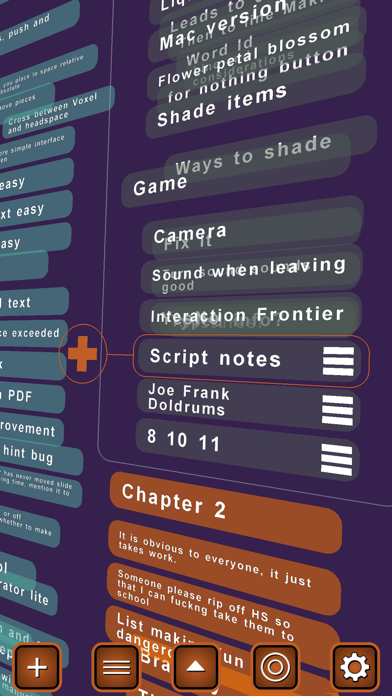
Headspace is a 3D outliner and mind-mapping application designed for iOS devices, specifically tailored for users looking to organize thoughts, make lists, and visualize information in a three-dimensional space. The target audience includes professionals, students, and creatives who require a dynamic tool for brainstorming and structuring complex ideas. Its primary value proposition lies in its unique 3D hierarchical display, which allows users to manipulate scale and space to gain perspective on their thoughts. Main differentiators include an animated sci-fi-like interface, 3D navigation using familiar finger gestures, and cross-file linking capabilities. While the business model is a paid upfront app purchase, typical use cases range from project planning and task management with to-do checkboxes to academic outlining and visual brainstorming.
Exhibit — Original Store Description
*** PLEASE NOTE: This NOT the meditation app! *** (There is another app called "Headspace: Guided Meditation and Mindfulness" and this is NOT that app!) This is the *original* Headspace! HEADSPACE is iOS's coolest 3D outliner and mind-mapping app! Do your list-making and mind-mapping in 3D space with the *original* Headspace. "Five stars on iPhone, completely off the scale on iPad" "This is the app I've most wanted to run on the iPad since the day it was announced, and the app that anyone looking over your shoulder will immediately want to buy an iPad just to run. " "Love the program. Favorite app. Useful and looks great. " "The implementation is beautiful! In my opinion, Headspace is becoming one of the best apps in the store." "I bought Headspace last night on a whim - been fooling around with mindmapping apps lately. This is a little piece of brilliance, you know that, right? " "This app could not just be a mindmapping program, It has the capability to become a new kind of U.I. That in my opinion that improved over apples U.I." Headspace allows you to create items and groups of items on a floating plane in three-dimensional space. The hierarchy of items and their various sub-items make for a beautiful display of information as they recede into the distance. Simple and familiar finger gestures allow you to move around the space. Use the menu button to travel between various groups. Easily create links and travel between them. The beautiful animated interface is like something from a sci-fi movie, but it isn't just eye-candy. You can go from an "eagle-eye" view of your entire map to focusing on a single item with a simple pinch of your fingers. There's just something about being able to manipulate the scale and space that goes perfectly with the idea of outlining. Here's a rundown on all its cool features: ● build hierarchical outlines in 3D space ● use familiar finger gestures to navigate and zoom ● connect related items with link lines - even between files! ● change item color and opacity ● change text color ● 'Flick' up or down to travel to top or bottom of lists ● special characters and foreign-language support ● universal app -- runs on both iphone and ipad ● easy travel between groups and files ● cut-and-paste items ● search in spaces, notes, and files ● item notes for supplemental information (text/photo/url) ● optional accelerometer rotate ● customizable color palette ● "to-do" style item checkboxes ● 2D orthogonal mode ● sync files between your iphone and iPad with Dropbox ● file support for Freemind, the free multi-platform desktop mind-mapping program ● stunning PDF export w/ active note links Get some perspective on your thoughts. Try Headspace today! Let us know what else you'd like to see added, email headspace@flatblackfilms.com!
Official sitehttps://apps.apple.com/us/developer/id300244541
Module 03 — Keyword & ASO Analysis
Estimated — no live ASO provider connectedThe app suffers from extreme brand confusion with the highly popular meditation app of the same name, severely limiting its discoverability unless it targets niche 3D and spatial productivity terms.
| Keyword | Volume | Competition | Relevance | Opportunity |
|---|---|---|---|---|
| 3d outliner | Low | Low | 100 | High |
| mind mapping 3d | Low | Low | 95 | High |
| mindmap | Medium | High | 90 | Medium |
| freemind reader | Low | Low | 85 | Medium |
| brainstorming tool | Medium | Medium | 80 | Medium |
| visual organizer | Medium | Medium | 85 | High |
| concept map | Medium | High | 90 | Medium |
| idea board | Medium | Medium | 75 | Medium |
| hierarchical list | Low | Low | 80 | Medium |
| beautiful interface | Low | Medium | 60 | Low |
| intuitive mindmap | Medium | High | 85 | Medium |
| thought organizer | Medium | Medium | 90 | High |
| 3d list maker | Low | Low | 95 | High |
| productivity outline | Medium | High | 75 | Low |
- Rebrand or append the app title to emphasize '3D Mind Mapping' or 'Spatial Outliner' to differentiate from the meditation app.
- Target long-tail spatial organization keywords where competition is low but relevance to the unique 3D interface is extremely high.
- Optimize the subtitle and metadata to explicitly mention compatibility with desktop formats like Freemind to capture professional users.
Module 04 — Market Insights & Demand Forecast
Estimated — no live market data provider connectedThe market for digital mind-mapping and productivity tools is mature and highly saturated, yet there is a persistent niche demand for highly visual and spatial organization systems. While traditional 2D mind-mapping tools dominate, spatial and 3D outliners appeal to power users looking for complex hierarchical visualization. The outlook is stable but highly competitive, requiring continuous modernization to keep up with cloud-first and collaborative standards.
While the 3D concept is highly innovative and visually appealing, severe brand confusion and intense competition from established 2D productivity giants limit its mainstream market attractiveness.
| Keyword | Trend |
|---|---|
| 3D mind mapping app | Stable |
| spatial outliner iOS | ▲ +8% |
| visual brainstorming tool | ▲ +15% |
| Freemind compatible iOS | ▼ -12% |
| Driver | Impact |
|---|---|
| Rise of spatial computing and AR/VR productivity expectations | High |
| Increasing demand for visual learning and thinking aids | Medium |
| Cross-platform file compatibility (like Dropbox and Freemind) | Medium |
- High brand confusion with the massive meditation app of the same name
- Steep learning curve of 3D navigation interfaces compared to traditional 2D lists
- Keeping up with rapid OS updates and native feature integrations on iOS
Stable demand driven by niche power users seeking spatial layouts, but limited mainstream growth due to brand confusion.
Moderate growth potential if the app pivots to support modern spatial devices like Apple Vision Pro.
Potential decline if core features are not updated to match modern cloud-collaboration standards.
- The app maintains compatibility with modern iOS versions.
- Dropbox sync remains a viable and secure synchronization option.
- The visual outliner niche remains loyal to non-subscription software models.
| Year | Forecast |
|---|---|
| 2026 | Stable Niche Retention |
| 2027 | Moderate Growth via Spatial Computing Updates |
| 2028 | Stable Performance |
| 2029 | Slight Decline without Collaborative Features |
| Country | Demand |
|---|---|
| United States | High |
| Germany | High Growth |
| Japan | Stable |
| United Kingdom | Stable |
| South Korea | Moderate Growth |
| Risk | Probability | Impact |
|---|---|---|
| Trademark and search visibility issues due to 'Headspace' meditation app dominance | High | High |
| Data loss or sync failures due to reliance on third-party APIs like Dropbox | Medium | High |
| User churn to modern, web-based collaborative whiteboards | High | Medium |
| Incompatibility with new iOS iterations if legacy code is not maintained | Medium | High |
| Opportunity | Impact | Complexity |
|---|---|---|
| Rebrand to resolve search confusion and establish a unique identity | High | Medium |
| Develop a native visionOS app to leverage the 3D spatial interface | High | High |
| Introduce real-time cloud collaboration for team brainstorming | High | High |
| Add Markdown import/export to appeal to modern PKM (Personal Knowledge Management) users | Medium | Low |
The app occupies a unique, highly visual niche within the productivity category, praised for its innovative 3D interface. However, it suffers from immense discoverability issues due to sharing its name with a world-famous meditation app, and its feature set relies on older paradigms like manual file syncing.
- Expanding into spatial computing platforms
- Leveraging the growing PKM (Personal Knowledge Management) trend
- Implementing modern collaborative features
- Severe search engine optimization (SEO) and App Store search dilution
- Technical debt from legacy file-based sync systems
- Aggressive feature expansion from well-funded competitors
The app is projected to maintain a stable, passionate user base in the short term. Long-term growth is heavily contingent on a strategic rebranding effort and adapting the 3D interface for modern spatial computing environments.
Module 05 — Search Analysis
Real search results · AI-classifiedHeadspace commands a highly visible and authoritative search presence, capturing the top three organic positions with its official domain and app store listings. Third-party reviews from health and wellness platforms reinforce the app's positioning as an accessible, evidence-based tool ideal for beginners managing stress and sleep. Community discussions indicate active user consideration and direct comparison with its primary competitor, Calm. Overall, the search landscape reflects strong brand authority, positive sentiment, and high user engagement across diverse web properties.
Headspace exhibits exceptional web presence, dominating the top search results with its official website, primary app store listings, authoritative health reviews, and active community discussions.
The brand maintains a highly positive reputation as an accessible, expert-led wellness companion, though users actively weigh its subscription value against key competitors.
The official site ranks first, immediately followed by official app store links, securing complete control over the above-the-fold branded search real estate.
- Develop targeted landing pages addressing the 'Headspace vs Calm' comparison to capture high-intent search traffic directly on the official site.
- Highlight beginner-friendly onboarding and guided sleep tools in marketing copy to align with the positive themes highlighted in third-party reviews.
Raw search results (6)
Headspace is your lifelong guide to better mental health. Through evidence-based meditation and mindfulness tools, sleep resources, mental health coaching, and ...
Welcome to Headspace, your expert-led guide to mental health, mindfulness, and meditation. Whether you're navigating stress, anxiety, sleep trouble, ...
Headspace is the everyday mental health app that supports anxiety, sleep, meditation, mindfulness, stress relief, and wellbeing.
Headspace if you're looking for a daily wellness companion that makes meditation, mindfulness, and healthy sleep habits accessible and enjoyable.
Headspace is a meditation app available for iOS and Android that may be great for beginners. With guided meditations, mindful workouts, and sleep techniques,
Hi there! I’m debating between getting a subscription between Headspace vs Calm. Could any of you provide me your own input of how you like Headspace? ...
Module 06 — Trends Analysis
Real trends data · AI-interpreted- Stable baseline hovering in the low-to-mid 40s from late July 2025 through early February 2026.
- A noticeable dip to 35 occurred during the year-end holiday week of December 28, 2025.
- First major surge to 94 in early May 2026, followed by a brief correction back to 50.
- Steady upward climb throughout June and July 2026, culminating in a peak index of 100 at the end of July.
Demand exhibits a clear mid-summer surge peaking in July, alongside a temporary dip during the late-December holiday period.
| Topic | Status |
|---|---|
| Reuters | Growing |
| Documentation | Growing |
| Digital object identifier | Stable |
| PubMed | Stable |
| OpenAI | Growing |
| Randomized controlled trial | Stable |
| Food and Drug Administration | Stable |
| GitHub | Growing |
Strong upward momentum driven by a massive surge in interest during the late spring and summer of 2026, ending at peak popularity.
- Search interest reached its maximum index value of 100 at the end of the 12-month period.
- Strong breakout interest in group meditation features and pricing options.
- High volume of academic and clinical-related topics like PubMed and randomized controlled trials indicating scientific credibility.
- A sharp, temporary drop in engagement during the winter holiday season.
- High volatility in May 2026 showing a rapid spike followed by a steep, temporary drop.
Interest is expected to cool slightly from its summer peak of 100, stabilizing in the 70-80 index range as seasonal summer demand tapers off.
A projected seasonal dip is anticipated around late December, followed by a typical New Year resolution-driven recovery in early Q1 2027.
Long-term outlook suggests sustained elevated baseline interest, potentially settling in the 65-75 range, driven by ongoing AI integrations and corporate wellness partnerships.
Forecast confidence: Medium
Headspace has experienced a powerful surge in market interest over the last year, transitioning from a stable baseline to peak popularity by mid-2026. This growth is heavily correlated with broader technological shifts, as evidenced by breakout queries linking Headspace to AI developments and tech news. The strong presence of clinical research topics suggests that consumers and enterprise clients are increasingly looking for scientifically validated mental health solutions. Overall, the brand is successfully capitalizing on both consumer wellness trends and technological integrations.
- Capitalize on the high interest in group meditation by launching and marketing shared wellness challenges.
- Leverage the strong association with clinical research (PubMed, RCTs) in B2B marketing to win corporate wellness contracts.
- Optimize pricing transparency and promotional campaigns during peak interest periods to convert high-intent searchers looking for premium plans.
Module 07 — App Reviews
Real reviews · AI-analyzedUsers generally love the unique, visually stunning, and interactive 3D approach to mind mapping and outlining that Headspace offers. However, there is a recurring undercurrent of frustration regarding stability issues, data loss during updates, and a perceived lack of active developer support. Since all provided reviews are from iOS users, there is no platform-specific sentiment comparison available.
Users are highly impressed by the futuristic, beautiful, and engaging 3D layout that makes organizing thoughts fun and interactive.
Reviewers appreciate the app's versatility as a blank slate for project management, brainstorming, and structuring hierarchical lists.
Multiple users report that the visual structure helps them stay focused, see new perspectives, and significantly improve their productivity.
A significant number of users report frequent crashes, particularly when editing text, creating groups, or using specific UI controls.
Several reviewers experienced major frustration after updates wiped out their existing links, notes, and previous work.
Some users find the process of entering text, moving nodes, and dragging-and-dropping items to be unintuitive or overly menu-driven.
“Headspace remains the most visually spectacular and functional (if not well-known) mindmappers ever created. Happily, it continues to deliver as a wonderful diagramming outliner/notetaker/brain storming tool!”
“The idea of building hierar…”
“It's so beautiful and slick that I find myself looking at my tasks more often, and actually getting them done.”
“This app tends to be customized to the way my mind works, plus it's the coolest looking mind-mapping app out there!”
“I did do the demo, but found this app to be a limited help and quite cumbersome, confusing I did ask for a refund, but was not provided one.”
“The latest update wiped out all of my notes/web links and all of my existing links between items, rendering all of my previous work useless. Yikes!”
“Using Ipad 3, latest iOS, crashes immediately upon entering text for first group! Useless. Please fix!”
“The graphics are terrible. The lines shimmer and flicker on both the iphone and the ipad 2. It would give me a headache to look at this app for more than about 3 minutes”
The feedback reveals a clear market gap for a highly stable, cross-platform 3D mind mapping tool. While users love the visual innovation of Headspace, they are deeply held back by its instability, lack of desktop companion apps, and data loss bugs. A competing application could capture this audience by offering a similarly beautiful 3D visual workspace combined with robust cloud synchronization (such as OneDrive, iCloud, or Dropbox) and seamless desktop integration. Additionally, implementing a reliable auto-save and undo history feature would directly address the primary pain points of users who lost work due to crashes.
- Prioritize fixing critical bugs that cause immediate crashes during text editing and group creation.
- Implement a robust database migration strategy for updates to prevent users from losing their existing links and notes.
- Streamline the user interface to make node manipulation, dragging-and-dropping, and linking items more intuitive and gesture-based.
- Develop a desktop version (OSX/Windows) with reliable cloud synchronization to allow users to view and edit their maps on larger screens.
- Add a dedicated 'Undo' function to prevent accidental data loss when groups or links are deleted.
Raw reviews (50)
I did do the demo, but found this app to be a limited help and quite cumbersome, confusing I did ask for a refund, but was not provided one.
Update: I held my breath after the flurry of iOS/iPadOS updates in recent weeks, concerned that I might lose access to favorite apps. And Headspace remains the most visually spectacular and functional (if not well-known) mindmappers ever created. Happily, it continues to deliver as a wonderful diagramming outliner/notetaker/brain storming tool! This app developer publishes frequent updates, both bug fixes and new features. Headspace remains my favorite mindmapper and, for that matter, it functions as a great visual outliner with its generous-sized popup note panels and easy-to-slide elements. Altogether, it's a pleasure to use so I use it often! PREVIOUS REVIEW: The most beautiful iPhone app is finally available for the iPad and as a universal app no less! iThoughtsHD is a fine mindmapper but Headspace is simply the most intuitive, easiest to use brainstorming application ever created for any platform. Don't believe it can be that great? Try it! You'll immediately discover that a three dimensional environment is the optimum way to display, stack and connect ideas. This developer has truly invented a "better mousetrap"! And now Headspace is a full resolution iPad for a fraction of the cost of most other mindmappers!
I find it easier to layout certain ideas in Headspace then using a standard mind map.
I bought the app based on a video by the developer. Pretty cool idea. Right now, the current version has a bug that causes the app to crash on creating a new group. You can contact the developer through the app, and I’ve reported the bug. Looking forward to an update. I like the idea, but I wish you could use the z-axis for something other than collapsing children. Perhaps place Groups at different "layers" in the z-axis, with perhaps the z-axis representing "time." Alternatively, multiple groups as "org charts" with links between individuals in different organizations appearing across the z-axis, while links (other than hierarchical wiring) between individuals within an organization appearing in the x-y plane. There aren’t a lot of apps that explore concept mapping or networks in a 3d environment. At least, not that I’ve found with a little bit of effort. This is fun to play around with, and does prompt some interesting thinking.
This is the only mind mapping app I use. Great for narrowing down the components of a project. I fear, though, that development has stopped on the app. There are bugs that need to be fixed, and I would also like to see the addition of other cloud options like OneDrive to use.
I came across this app while looking for a mind mapping app. Why this app isn't way more popular is beyond me! It's a showcase of not only an innovative and fun mind mapping app but an example for app developers. I've spent too much time staring at loading screens laggy apps that had not even half of the functionality that this app has. It's a 4MB app with huge customizability both in app and under settings. Sure it takes some getting used to, but there's an easy manual with visuals in the app itself. I really hope there is still developer support for this app. A truly stellar app!
Been using this app since the beginning. Works great on iOS7, and syncing via Dropbox and Bonjour work flawlessly between my iPad and iPhone. There are many cool mind mapping apps in the app store, but something about how Headspaces uses 3D space and color fx, makes the dry chore of keeping your ideas organized just so much more “fun” Would love and be happy to buy an OSX version to sync to. Please!!!
At first glance, I'm not sure what amazes me more -- the app itself or the fact that there are not already a vast ocean of glowing reviews. I am current long-time user of TheBrain, an advanced mindmapping tool, which I believe is the best in in world. I used TheBrain to plan and strategize a successful business, so I know it works. Headspace is the first app in the IOS world which I've seen take an innovative approach which has the potential to inspire new ways of connecting the dots in whatever field of endeavor you're in such as business, the arts, or even sports. The idea of building hierarchies with what are conventionally called nodes is a Head Space concept that I'll playing with a lot with. Best of luck to the developer.
Very enjoyable & easy to use, though a little buggy & prone to hanging/crashing once I've had it open for a while. But still a beautiful app to look at iCloud-based sync would be great, hopefully that is in the works!
After buying the full version I realized I needed a computer to transfer the work I had already worked on. But that's just apple. I'm using this app with Apple TV for business presentations. I'f there was a desktop version on osx that I could sync with I would pay soooo much money for it.
Using Ipad 3, latest iOS, crashes immediately upon entering text for first group! Useless. Please fix!
Hi this is Bob with Headspace -- @jammkat I'm sorry, a new update is on the way. With regard to changing the text color, if it continues to happen after the 3.1.1 update, please let us know. The Feedback button works now -- sorry, that is embarrassing! Thank you very much, Bob Headspace
Testing on a new iPad and after a restart, the text color picker fails completely to change the text color when editing an item. Also, hitting the funny looking "X" on the right side of the text color picker area results in an instant and repeatable crash to homescreen. Also, the app seems to just like to crash a lot on its own, even while i was trying to use their Help-Contact Us interface to email this bug report. Please fix and all will be sunshine and rainbows! The ability to change the text color is what has prevented me from using this app for a couple years now as I found the white text fairly unreadable. Beyond that, I really like the look and feel of the interface. It's easy to drag things around, reorder them and zoom in and out, something other apps seem to make clumsy but this one makes slick and responsive. ETA: confirmed the same bugs on an iPad 1, but everything functions as expected on an iPhone 4.
This is the single most imaginative, useful, and downright fun brainstorming tool for the iPad. A must.
Exactly what I was looking for. Keep up the good work.
A little style over substance but it looks futuristic like Minority Report mind mapping!
I got this app a while ago and I have been very pleased with it. I'm really glad to see that the developer is still adding new features. I use to use it on my iPod touch but now I use it on my Ipad and the resolution still looks REALLY great. Great job and keep up the great work!
I like the Dropbox integration and new linking method, but I lost all my existing links. There were too many to recreate. Disappointed that I lost my links...very disappointed. Perhaps they could be restored somehow? This is one of the primary features in my opinion, and over the last year and a half, I've used this tool for many purposes...I hope I don't have to change to another tool because of failure to update old files to work with new app versions.
The app is a useful one and the update has some cool functions but the update seems somewhat buggy. I went to change files and the screen flickers between the 2 files making the whole app useless at that point. Please fix this, it has been a great app and it's potential is awesome.
The latest update wiped out all of my notes/web links and all of my existing links between items, rendering all of my previous work useless. Yikes!
This is definitely an incredible tool. It's not only helpful in the mapping respect but it's invaluable to "see" my own thoughts in yet another perspective. I'm able to work through some thoughts/jobs/tasks/goals and ferret out things I haven't thought of or problems. It's an awesome thinking device on top of everything else.
Would love to see: iCloud syncing between iOS devices over iCloud Evernote support Dropbox support webdav support Thanks!
I was hoping that the third dimension was actually an additional relative data-space. Instead the third dimension aspect is simply used as a means to implement the typical mind-map "collapse" functionality. As of yet I can't see any added value created by having the collapse functionality represented as children nodes stacked behind the parent node as opposed to just hiding the children nodes. This isn't a bad app, it's pretty solid and I like the search functionality. I was simply hoping the "3-D" part of the app was more than just a presentation tweak. Maybe some more export options would help, like a preset that outputs reasonably large images using an optimized angle of the 3-D map. (would like to be able to press and hold on an image in the web browser view and be able to choose to copy the image URL)
This is sort of a cute app, but VERY half-baked. Certainly not worth $3.99. * The graphics are terrible. The lines shimmer and flicker on both the iphone and the ipad 2. It would give me a headache to look at this app for more than about 3 minutes * The user interface is clunky. The Big Idea is 3 dimensions and all of the gestures are devoted to somewhat pointlessly moving nodes in 3 dimensions. However, the basic task of getting information into slots is very 1990s -- you do everything through a menu. There are no gestures for entering or changing nodes or rearranging them because all the screen gestures are taken up by moving the nodes around in three dimensions. So don't imagine that you can grab a node and move it. You click it, click menu, click copy, click done, click the other node, click paste, select child option, click done, That gets really clunky after a node or two. * And what do your three dimensions get you? You can flip a set of nodes completely around so that you are looking at their backs. BUT, you can't edit the back. So flipping the nodes around is completely pointless. All in all this is a One Big Idea app which is poorly done in the basics (entering text, moving nodes) and which doesn't exploit the Big Idea for all its worth.
I can finally add photo on the notes option.
I am starting to like this tool a lot. It needs to borrow as much from other mindmapping apps as possible to make it more fully featured: -Group header should be bold text or larger than children -Arrows ends need to be more graphically appealing -OPML export is a requirement to have these mind maps usuable in a number of desktop applications -Automatic random color or ROYGBV rainbow selection for new groups -Bullets added to children if desired -Group or Header graphic symbol to the left of text if desired -For entering new groups or children less option clicking to get it added to the headspace. Let the options for color change, links, notes, and etc be optional. Just keep it simple and quick in terms of populating the mindmap in Headspace Once the photo import works this app moves to 4 stars. Implement the other options and you have a 5 star app.
I'm a terribly unorganized person, and I've tried many different types of systems to fix that problem. Most times I get started and stick with it for a week, then I forget about it and move on. Headspace is so unique that I've been able to stick with it for two months now. The nice thing about it is that it's a blank slate, you don't have to fit your tasks / notes in the app's predefined categories -- you easily make your own categories. Honestly the graphics are superfluous and unnecessary... but I think that's key in my use of it. It's so beautiful and slick that I find myself looking at my map even when I don't need to enter data or reference something. The syncing between iPads and IPhones is not perfect, but it's close and incredibly useful to have. Highly, highly recommended.
This app tends to be customized to the way my mind works, plus it's the coolest looking mind-mapping app out there! I would highly recommend it to anyone, as i've noticed my productivity time improve three-fold. Well worth the money! Many cool features: export as .pdf, import mm and .hs to Headspace wirelessly,Bonjour Sync. Change group color and background color along with the alpha values, auto-organize... may I go on. I'm glad I decided to spend the 3.99!
(update) This app is kick $@. I am freakin blown away by it. It is so awesome to traverse through the cells and create layers of information. I was going to buy Mindnode after having tried their lite version, but I am sooo glad I bought this one instead. Take my advice, this is it. Not sure why it has a low average star rating, but compared to any of the other mind mapping apps I've tried this one is my top favorite. It's awesome. What you can possibly do with this three dimensional, or two, layout is a blast and works much better in outing things into perspective than your traditional line mind maps. Much, much better. Awesome.
Works very well, easy to use, physically fluid, and visually stunning. Nice way to organize, and see how ideas are connected.
I don't k ow why this app isn't featured as the best mind mapping app out there. It's beautiful and allows a level of detail that others can't compare with. Love it. My only wish is that he come up with a desktop version as well.
Pretty much exactly what I wanted. Simple tool to create hierarchical lists and outlines with the added bonus of a neat, futuristic 3D view. My only suggestion would be to give the user a more intuitive way to create links between items, as having to go in and edit an item to start linking it to other items is pretty clunky.
WOW, talk about a fantastic user experience. This is the first mindmapping software I have used that makes me feel like I am inside the map, traveling around my thoughts. How cool and it has had the effect of making it easier for me to stay focused on my thoughts and processes. It isn't just bells and whistles though, it has everything I need to make effective maps. It has parent/ child outlining and nesting abilities which other apps don't. The ONE thing it REALLY NEEDS is UNDO! I have lost whole groups without anyway to retrieve them. Seriously, it's a fantastic app and has made my mindmapping experience extremely pleasent.
Great visual way to connect thoughts together. I love the parent child relationship and the way you can follow a thought process through the links established - one thought to another. I also love the check boxes... ;)
But it does seem more focused on looks than features. I love the export functions. I wish there was a simpler way to just drag a child from one group to another, although you can copy and past, it's just a halting process when your in the zone mind mapping! As always though, there is room for improvement! Keep it up!!
Like it. Great for hierarchical lists or outlines. Developer: Only 1 beef, and it's purely aesthetic: editing 3d items should NOT revert to a 2d editing interface. Why make edits flat? Why not hold the child/parent down till it wiggles (like standard Apple interface) then proceed to editing functions?
I really enjoy this app and it is a fun way to manage your tasks. I have a request... The actions to zoom in/out and to move a group are too similar and it is very tricky to move a group! If it wasn't so frustrating to move groups I would give this five stars!
I really like this app. It's great for both mind mapping and managing checklists. I especially like the stacking effect when collapsing branches, since it gives a quick visual indication of how much information is hidden. My only real complaint is that the landscape orientation moves the controls to the left side of the screen. This is a little awkward for me a a right-handed person, since I have to move my hand repeatedly to the far side of the screen. One bit of possible improvement would be the addition of a "checkbox" switch to the item creation dialog. It might also be worth having an "Advanced..." button to customize appearance when creating the item instead of having to do the additional step of editing the item after creating it. There are a few interoperability issues. The first such issue is the lack of a means to import your workspace from the "Lite" version. The other is that some formatting, specifically the checkbox function, doesn't survive being edited in FreeMind and being reimported. The checkboxes show up as icons in FreeMind, but are lost when importing back into Headspace. I'm not sure if it's just an issue with the latest FreeMind version upgrading the file when saving changes, but it's a bit inconvenient. It only happens when the file gets edited in FreeMind, so it's not a problem if you're only collaborating with other Headspace users.
throw away all your mindmap apps and get this one! It's brilliant.
This app is the most beautiful and useful program I've ever had the pleasure to run. I seriously look at it fifty times a day. I keep coming up with more ways to use it and it is quickly overtaking app after app on my iphone as other apps become superfluous. I had an issue with the previous version and the developer kept in immediate and constant contact until it was resolved- extremely quickly. This app is worth every penny. I use it as a todo list, a note taker at meetings, as storage for texts and notes, to track clients and upcoming jobs... And I never get tired of looking at it and scrolling through the lists. Trust me. Just buy it.
Just another pretty face. Use this app if you want to create a stunning display for use in a presentation. Don't use this app if you take mind-mapping seriously. This one is all gum balls and candy wrappers. Headspace does not allow you to easily and quick build a map. Once child node is added, you can't just drag/drop it to another node, only within the node where it was first created. I was already frustrated having only used it for five minutes. Stick with MindNode or iThoughts.
Beautiful interface that is intuitive enough, though perhaps weak or unintuitive in a few areas, such as dragging and dropping tasks from one container to another. Also it seems to lack style templates that automatically applies styles at different levels, so even though you can apply beautiful styles to each task or container, you have to manually apply reformatting to each time you create one (there is a copy feature but that seems unintuitive). I was going to give the app 4 stars, but just as I was getting the hang of the application and getting some data put in, the application crashed and (apparently) lost 30 minutes of work. There is a Save As feature but no Save button. Given that, I am giving up on this application, but if you choose to keep using, please make periodic exports of your work. Among competitors, Idea Sketch is workable but feature limited, mostly too weak for my needs. iThoughts has great user ratings but is more expensive than Headspace. But an application that loses work isn't worth cost effective at any price.
I've had this app for a long time...still waiting for an update of some kind to take advantage of the hardware/firmware upgrades from Apple. I bought this with an IPhone 3G quite awhile ago and it was cutting edge...now seems obsolete with an iPhone 4. Not sure if they care or are still in business so I'd hold off spending money on this until they show they care or are still around...only my opinion of course!
This is an awesome app but there is a glitch since OS 4 which sometimes causes the keyboard to pop up without a title dialog box when you attempt to create group children. The glitch isn't a huge deal- just restart the app and pick up where you left off. But it gets to be pretty annoying and wouldn't be worth the price of admission if I hadn't bought the full version a couple of updates ago. Use the free one until they fix it.
This is an app custom made for the iPad, but only available on the iPhone. I will give this 5 stars when there is an ipad version.
Like their app Voxel, this makes 3d (and in this case Getting Organized!) fun. I bought them both last night. Like Voxel, I wish for graphical export options (though the text export is good!) and also a little more stylistic control ( numbered bullet points, for example ) but the style they have is really cool! What can I say. Five well organized stars for HeadSpace! * * * * *
This app is amazingly useful but I enjoyed the old icon better. The new icon lacks character
Awesome app. I bought this on whim and absolutely love it. Great for organizing projects, day to day life or just all the clutter in our brains. I use it for task/project managment at work and organizing my hobbies at home. I love how the format lets you pretty much view everything very easily all at once instead of sifting through pages.
An intriguing and oddly interactive interface... beautifully designed... however, I found out the hard way to not try and do to much with it in a moving car...I accidentally put one link about 4000 miles away from the rest of my map...
It's nice to play around with this app, but you can't sync or load it anywhere. Eventually you need to see your work on paper, or at least on a bigger screen.
Module 08 — Build Recommendations
Estimated — strategic synthesis, not a guaranteeBuilding a 3D spatial mind-mapping app is a highly viable niche opportunity, provided you immediately solve the original app's critical data loss bugs, rebrand to avoid catastrophic search confusion with the massive meditation app, and target spatial computing platforms.
The difficulty is High due to intense competitive pressure from 5 major established players like MindNode and Miro, combined with the technical complexity of building stable 3D interfaces on iOS.
Implementing robust auto-save, local-first architectures, and reliable undo history to prevent the data loss and broken links that plague the current alternative.
Naming and positioning the app strictly around '3D Spatial Mapping' or 'Spatial Outlining' to completely bypass search confusion with the Headspace meditation brand.
Refining the clunky drag-and-drop mechanics and node-grouping physics so 3D spatial navigation feels fluid rather than frustrating.
Ensuring native compatibility with desktop formats like Freemind and modern Markdown, enabling seamless integration into professional workflows.
Users explicitly complained about a lack of desktop (OSX/Windows) synchronization and cloud options like OneDrive, alongside severe data loss after updates.
Identified as a medium-complexity, high-impact opportunity to capture power users in the Personal Knowledge Management space who need structured text interoperability.
The market analysis highlights a high-impact growth driver in spatial computing and AR/VR, where a 3D outliner naturally excels over traditional 2D tools.
App Store review disadvantages highlighted clunky and unintuitive drag-and-drop mechanics for moving nodes between groups.
Power-user researchers, visual learners, and PKM (Personal Knowledge Management) enthusiasts who find traditional 2D mind maps too restrictive for complex hierarchies.
Free download with a one-time lifetime premium unlock or a low-tier annual subscription for multi-device sync and advanced export formats.
4-6 months for a highly stable, focused iOS/iPadOS release
- Develop a stable, bug-free core 3D engine on iOS/iPadOS with local-first storage.
- Launch a public beta targeting active subreddits like r/ObsidianMD, r/PKM, and r/mindmapping to gather feedback on node physics.
- Optimize App Store metadata targeting long-tail keywords like '3D outliner' and 'spatial mindmap' to avoid meditation-related search volume.
- Pitch the app directly to Apple's editorial team as a showcase for iPadOS gesture capabilities and visionOS spatial design.
- Publish comparison articles and videos demonstrating how your app solves the data loss and sync issues of legacy 3D outliners.
| Risk | Mitigation |
|---|---|
| High brand confusion and poor organic search visibility due to the dominant meditation app 'Headspace'. | Choose a highly distinct, descriptive name like 'SpatialNode' or 'AetherMap' and aggressively target long-tail ASO keywords. |
| Steep learning curve of 3D navigation interfaces causing early user churn. | Build an interactive, 30-second interactive onboarding tutorial that teaches basic finger gestures and 3D space manipulation. |
| Technical debt and crash loops when rendering highly complex, deeply nested 3D node trees. | Implement strict node-limiting thresholds for the MVP and utilize native Swift/Metal APIs to optimize rendering performance. |
Building a spatial 3D outliner presents a lucrative opportunity to capture a highly passionate niche of visual thinkers who are currently underserved. While the concept of a 3D mind-mapper is highly attractive, the existing market solution suffers from severe brand confusion, frequent crashes, and catastrophic data loss. By entering the market with a rebranded, rock-solid alternative that prioritizes data integrity, robust cloud syncing (iCloud/OneDrive), and Markdown compatibility, you can easily win over frustrated power users. Focus first on perfecting the touch physics and local stability on iPadOS, then leverage spatial computing trends by expanding to visionOS to future-proof your product.
Run this analysis on any app
Everything above was generated from a single search. Your first report is free — no credit card required.
Get your free report